About us

World Best Blog Site for Solve your Computer Problems,Download Free Register Software And Games, Send free SMS Online, Check Information about yourself,Watch Live TV,Get Icons,Online Games And Muck More Join Me On Ara websites.
Showing posts with label Windows tat. Show all posts

Sunday, 20 July 2014

Grand Theft Auto San Andreas English Language Files

How To Change Language files of GTA San Andreas

And make English language .

Follow These Steps.

Step 1:Go to your GTA San Andreas Game directory.

Step 2:Open Text Folder .

Step 3:Download Files from my web site and Extract them on your desktop.

Step 4:Copy Extracted files from your desktop and paste and replace them on text folder.

Now Check out your games language is English

Enjoy…..Only by Ara...


if it was helpful than plz seed (Shear) 


or on the page

Thursday, 3 July 2014

How to use or Change VLC skins?

How to use or Change VlC skins?

Skins do not work on Mac OS X!
Put the downloaded VLT files in the following folder:
  • On Windows: the skins folder in the VLC installation directory (e.g. C:\Program Files\VLC\skins)
  • On Linux/Unix: ~/.local/share/vlc/skins2
Then open your VLC settings and change your interface from native to skins. You can choose your desired skin already there or change it when you are in the skins mode by rightclicking somewhere on the skin and going to Interface>Choose Skin.
VLC needs to be restarted to change to skins mode.

Download  The Skins ON THIS LINK

Monday, 30 June 2014

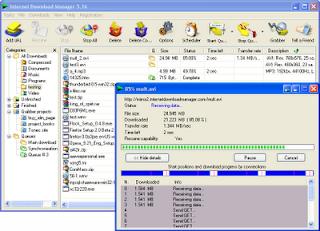
Internet Download Manager Fake Serial Number Problem Solution

2

Internet Download Manager Fake Serial Number Problem Solution

Internet Download Manager is registered with a fake Serial Number or 30 day trial end maybe you have face this problems after installing IDM. This generally happens after upgrade a new version of IDM. “IDM has been registered with a fake serial key or the serial key has been blocked, Internet Download Manager is exiting”, then if you click OK button here come out the registration form to enter a valid serial number, but u don’t know what is the serial number and how to properly install it.

Monday, 16 June 2014

"Task Manager has been disabled by your administrator" error message

SUMMARY


The following knowledgebase will help you to resolve the error message "Task Manager has been disabled by your administrator" when you try to use "Task Manager"

SYMPTOMS


When you try to open Windows Task Manger, the following error may appear: "Task Manager has been disabled by your administrator".

CAUSE

There following

1. You use account that was blocked via the "Local Group Policy" or "Domain Group Policy".

2. Some registry settings block you from using "Task Manager".


1. Verity that the "Local Group Policy" or "Domain Group Policy" doesn’t block you from using

"Task Manager".

1.1 "Local Group Policy"

a. Go to "Start" -> "Run" -> Write "Gpedit.msc" and press on "Enter" button.

b. Navigate to "User Configuration" -> "Administrative Templates" -> "System" -> "Ctrl+Alt+Del Options"

c. In the right side of the screen verity that "Remove Task Manager"" option set to "Disable" or "Not Configured".

d. Close "Gpedit.msc" MMC.

e. Go to "Start" -> "Run" -> Write "gpupdate /force" and press on "Enter" button.

Note: If you are using Windows 2000, please follow KB q227302 instead stage "e".

Using SECEDIT to Force a Group Policy Refresh Immediately
http://support.microsoft.com/kb/q227302/


1.2 "Domain Group Policy"

a. Contact you local IT support team.


 2. Verity correct registry settings::

a. Go to "Start" -> "Run" -> Write "regedit" and press on "Enter" button.


Warning: Modifying your registry can cause serious problems that may require you to reinstall your operating system.
Always backup your files before doing this registry hack.

b. Navigate to the following registry keys and verity that following settings set to default:

Windows Registry Editor Version 5.00

[HKEY_CURRENT_USER\Software\Microsoft\Windows\CurrentVersion\Policies\System]
"DisableTaskMgr"=dword:00000000

[HKEY_CURRENT_USER\Software\Microsoft\Windows\CurrentVersion\Group Policy Objects\LocalUser\Software\Microsoft\Windows\CurrentVersion\Policies\System]
"DisableTaskMgr"=dword:00000000

[HKEY_LOCAL_MACHINE\SOFTWARE\Microsoft\Windows\CurrentVersion\policies\system\]
"DisableTaskMgr"=dword:00000000

[HKEY_LOCAL_MACHINE\SOFTWARE\Microsoft\Windows NT\CurrentVersion\Winlogon]
"DisableCAD"=dword:00000000

c. Reboot the computer.

MORE INFORMATION

Contact Us

Thursday, 29 May 2014

How can you get RocketDock dock only appear in desktop?

How can i get RocketDock dock only appear in desktop?

I can't get rocketdock to only appear in desktop. If I hover over it, the dock it opens. I don't want that when I am running applications! Please help!

Sunday, 6 April 2014

IDM Fake Key Serial Number Block Problem Solution

Internet download manager (IDM) allows users to automatically download any file types, divides downloads into multiple streams for faster downloading, batch downloading, Import and Export of download jobs, auto/manual update of download address, supports multiple queues and lists recent downloads for easy access to files. Internet Download Manager has a smart download logic accelerator that features intelligent dynamic file segmentation and safe multipart downloading technology to accelerate downloads.

Saturday, 21 December 2013

Sim information System

Pakistan Sim Checker | Trace number

Pakistan Telecommunication Authority (PTA) has developed a SIM (Subscriber Identity Module) information and Verification system to address associated risks on security and to ensure subscription regulations in cellular sector. 

The objective of the project is to provide a consumer-based facility to mobile subscribers in Pakistan by which they would be able to find out the total number of SIM(s) registered against their respective CNIC number with each mobile operator.